
DIRECT ANSWERA prompt shapes one generation. A reliable workflow also manages current sources, explicit state, deterministic checks, approval, writeback and verification.
For a while, my answer to weak AI output was simple: keep editing the prompt.
If the ad concepts looked too similar, I added a rule that every group must represent a different user task. If the copy claimed something the product could not prove, I added an evidence requirement. When fields went missing, I added the format, length and required-field rules too.
The prompt grew longer, and the first draft did improve. Yet the same rework returned on the next project. The input was out of date. A product page conflicted with an internal note. The form passed validation, but the final asset was not safe to launch. Someone changed the result without updating its state. The AI said it had written a file, while the shared record still contained the old version.
That was the distinction I had missed. A prompt can improve a generation. A workflow has to carry a task from current evidence to a usable result without hiding failures along the way.
A prompt can constrain an answer. It cannot, by itself, prove that the facts are current, define who may approve a change, or verify that the result was actually written back.
Why the prompt kept getting longer
The original task looked contained: use the product material to generate a complete media plan.
The first failure was factual. The model filled gaps with plausible claims that had no product evidence, so I added source restrictions. The next failure was strategic. Several ad groups had different titles but described the same task, so I added differentiation rules.
Later problems appeared in images, links, tracking fields, status labels and final rendered pages. Each new problem became another paragraph in the prompt until it was carrying a long list of cautions.
Those cautions were useful, but they were asking the prompt to control things outside generation. A prompt cannot guarantee that it received the latest source. It cannot stop a later step from overwriting a human-owned field. It does not know that a client draft and a launch-ready plan need different gates unless the surrounding system represents those states.
When failures come from both ends of a task, polishing the instruction in the middle only makes the instruction heavier.
What belongs to the prompt, and what belongs to the workflow
| Problem | What the prompt can do | What the workflow must add |
|---|---|---|
| Input facts | Tell the model which material to use | Select current sources and expose missing, conflicting or stale evidence |
| Output | Define tone, structure and fields | Store the result in a stable structure that later checks can read |
| State | Say that the output is a draft | Distinguish proposal, client draft, launch-ready and post-launch states |
| Quality | Ask the model to review itself | Run deterministic checks, then route factual and risk decisions to a person |
| External write | Ask for an update | Verify the account, target, permission and fields allowed to change |
| Completion | Summarize the work | Read the file, page or record again and confirm the external state |
The prompt is still part of the system. It is good at drafting, explaining and working through ambiguity. Reliability comes from combining it with controlled sources, stable structure, programmatic checks, human gates and recorded outcomes.
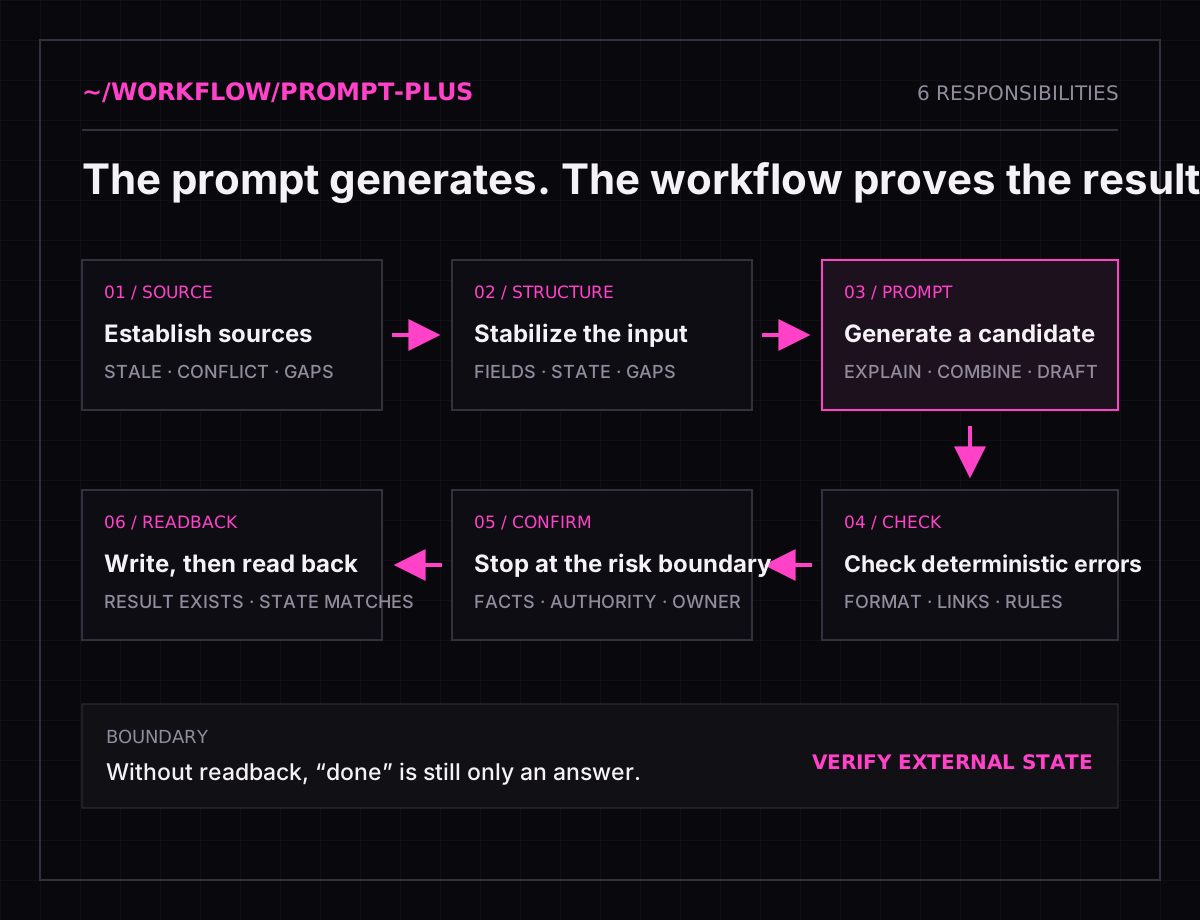
The six responsibilities I now separate
1. Establish the source of truth
The website, product notes, client feedback and an older plan may all exist at once, and they may disagree. Before generation begins, the workflow has to label what is current, what is reference material and what still needs confirmation.
Without a defined source, a more persuasive prompt can make an unverified claim sound more certain.
2. Turn input into a stable structure
I separate the product, audience, user task, evidence, landing page and tracking requirements. Missing information stays missing instead of being filled with a confident guess.
A stable structure also makes later changes cheaper. The workflow can update the part that changed instead of explaining the entire conversation again.
3. Generate a candidate
This is where the prompt belongs. The model can combine evidence, propose scenarios, draft copy and point out gaps. Its output remains a candidate.
Generated means there is something to inspect. It does not mean the claim is true or the work is ready to ship.
4. Check deterministic errors
Missing fields, length limits, malformed links and incorrect image dimensions do not require a person to rediscover the rule on every run. A program can catch them consistently.
Once those checks pass, a person can focus on the harder questions: Is the product understood correctly? Are the scenarios meaningfully different? Does each claim have evidence? Does the destination continue the promise?
5. Stop for a human at the risk boundary
The workflow should pause before changing product facts, client-visible material, real accounts or shared external state. The reviewer needs the candidate, the evidence and the remaining unknowns before choosing to continue, return or hold.
Human review is not a final glance. It assigns decision authority to the steps that cannot safely pass on inference alone.
6. Read the result back
The last step is not an AI message that says “done.” The workflow must confirm that the file was created, the link points to the new version, the shared record changed and the final page contains what was approved.
If readback fails, the state is failed or pending. It is not complete.
What changed in practice
Before this separation, delivery depended on whether the operator remembered an increasingly long prompt and every earlier failure.
Now each failure has a destination. Source conflicts return to evidence review. Format defects stop at deterministic checks. Unsupported claims remain candidates. Client drafts and launch-ready work use different gates. Any real write is followed by readback.
This does not automate every task. It removes repetitive checking from people while preserving the places where judgment matters.
It also gives a team something better than one person’s prompt. Everyone can see which facts are active, what state the plan is in, which check failed and whether the next correction belongs in the source, the rule or the finished work.
When a prompt is enough
Not every use of AI needs a workflow. A clear prompt is often enough when the task happens once, all input is in the current conversation, the result is easy to inspect and nothing will be written to a real account or shared system.
The surrounding workflow becomes necessary when:
- the task repeats and requires the same background every time;
- sources come from several places and may change or conflict;
- output enters a real file, client deliverable, account or shared system;
- one error can contaminate later work;
- completion must be proven by checking external state.
Before automating that kind of task, I now ask six questions: Where do the facts come from? How is the input stabilized? Is the model producing a draft or a fact? Which errors can be checked deterministically? Where must a person decide? How will the system prove that the write succeeded?
If those questions have no answer, making the prompt longer is not the next fix.
Related Writing
- Why a Complete Media Plan Can’t Launch
- Automated Price Checks Still Need Me
- Your Dashboard Says Zero. The Tracking May Be Broken.
PUBLIC NOTEThis article comes from real work. Client details, data and non-public implementation details have been removed.